
For foster carers
Version 1.0.0 – in developmentDocument professionally. Keep the child at the center.
Focus Foster is a personal tool for long-term, short-term and kinship foster care: a record for each child, documents, reports and proofs in one secure place – encrypted on your device and fully offline.
- Works fully offline, no account needed
- Encrypted on your device with AES-256-GCM
- No names, reports or documents on our servers
- No ads, no tracking
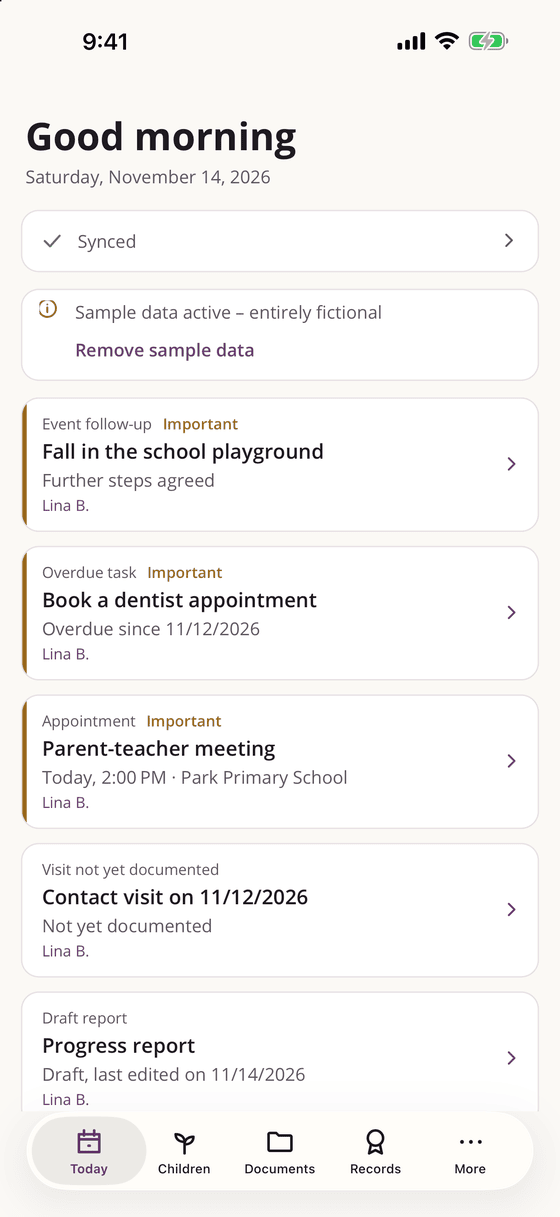
Everything about your foster placement in one place
Focus Foster brings together what is otherwise scattered across notebooks, folders and phone notes – structured, searchable and ready for the next care planning meeting.
Document professionally
A chronology that keeps observation, statement and assessment clearly apart – the basis for factual reports.
Stay organized
Appointments, tasks and reminders, expenses with reimbursement status and expiry reminders for authorizations.
Stay secure
Encrypted, offline and protected by an app lock. Security features are never part of Pro.
The child at the center
Everything is organized per child – from personal details and the people involved to documents, contacts and visits.
Privacy
Local first – your records stay with you
Focus Foster was designed from the start for sensitive information about children. These principles apply on every platform.
Fully offline
Every form works without a network, account or sync. An outage of sign-in or billing never blocks access to your own data.
Encrypted on the device
All entries and documents are stored with AES-256-GCM; the key is kept in the secure storage of the operating system.
No content on our servers
Our account backend only knows a pseudonymous account ID and technical sign-in data – no names, reports, documents, file names or AI input.
Security is never Pro-only
Encryption, app lock, PDF and TXT export, local backup, full export and deletion are free. If Pro ends, no data is deleted or hidden.
Features
Made for everyday foster care
From the first entry to the finished report – Focus Foster accompanies the whole placement.
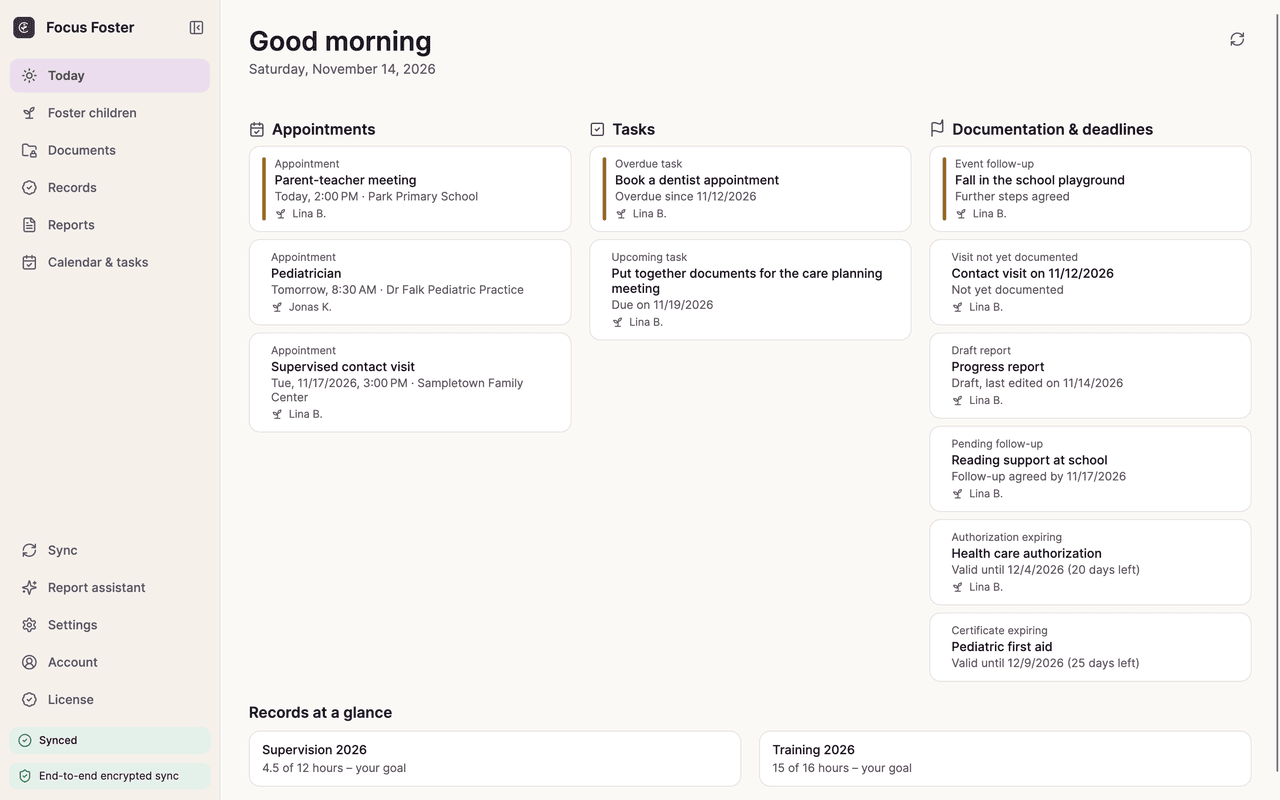
Your day at a glance
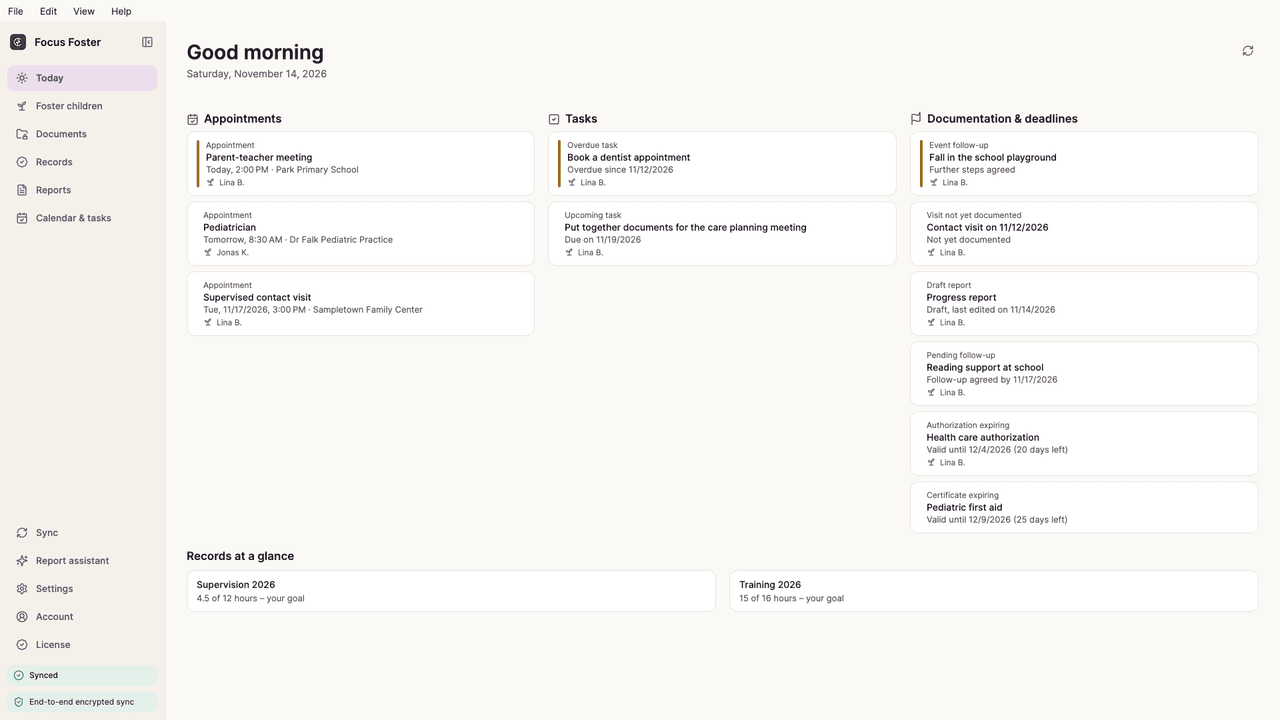
The today view shows what matters now: appointments, open tasks, missing documentation and expiring deadlines.
- Appointments, tasks and reminders – without sensitive content on the lock screen
- Expenses with reimbursement status
- Expiry reminders for authorizations and certificates
- Optionally copy appointments to the system calendar with the neutral title “Appointment”
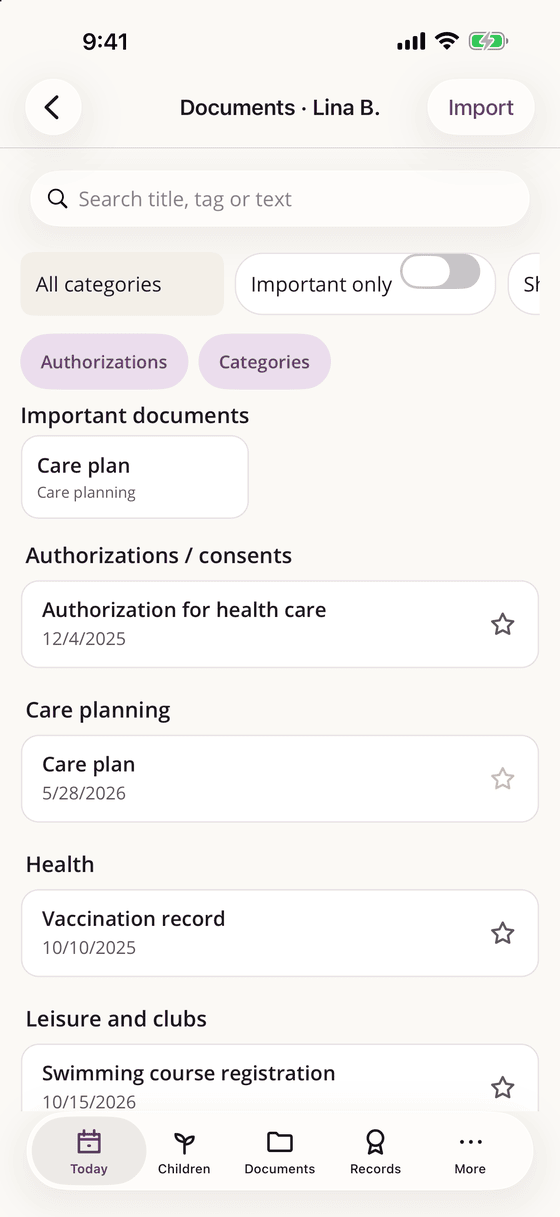
A digital record for each child
Personal details, the people and agencies involved, chronology and documents – organized per child.
- Personal details, people and agencies involved, authorizations with expiry reminders
- Chronology that keeps observation, statement and assessment clearly apart
- Important events with actions taken and who was informed, contacts and family visits
- Documents in categories with versions; import from files, photos, the camera and the document scanner
- On-device text recognition and full-text search in documents (Pro)
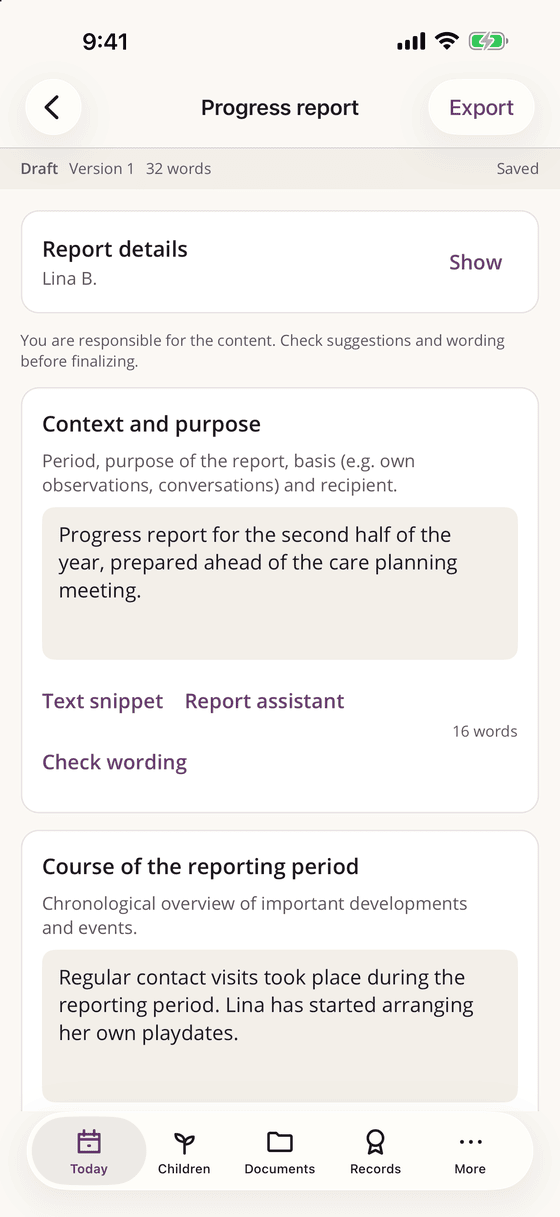
Reports that stay factual
Templates guide you through development, progress, contact and closing reports – with export to PDF and TXT.
- Free templates: development report, progress report and free statement
- Six further templates with Pro, for example for the care planning meeting, the annual report and the closing report
- Text snippets: system snippets for free, your own snippets with Pro
- Export to PDF and TXT; DOCX export and custom templates with Pro
- The report coach points out judgmental or unclear wording – no scores, no diagnoses
Report assistant with local AI
Helps you word reports more factually and with a focus on observation – and shows every suggestion side by side with your text.
- Runs on the device: Apple’s on-device language model on iPhone and iPad, a local model on Android, Mac and Windows
- Only what you confirm is applied – nothing is replaced automatically
- A fact check flags changed numbers, quotes, people or negations
- External AI providers are off by default and only usable with your own API key
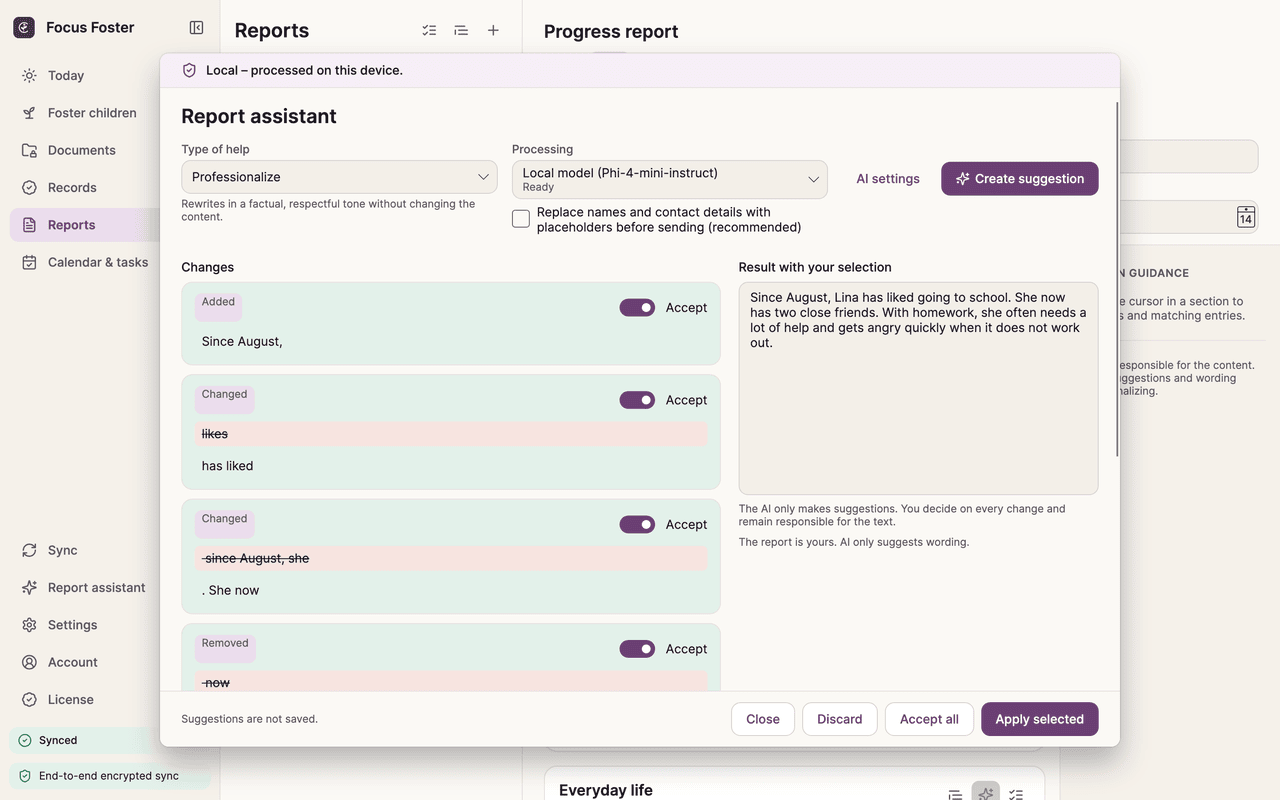
Supervision, training and certificates
Keep track of hours, goals and certificates – and create a proof document as a PDF.
- Supervision and training hours per year with your own goals
- Certificates with validity and expiry hints
- Hints for entries that have no certificate of attendance yet
- Qualification portfolio with Pro
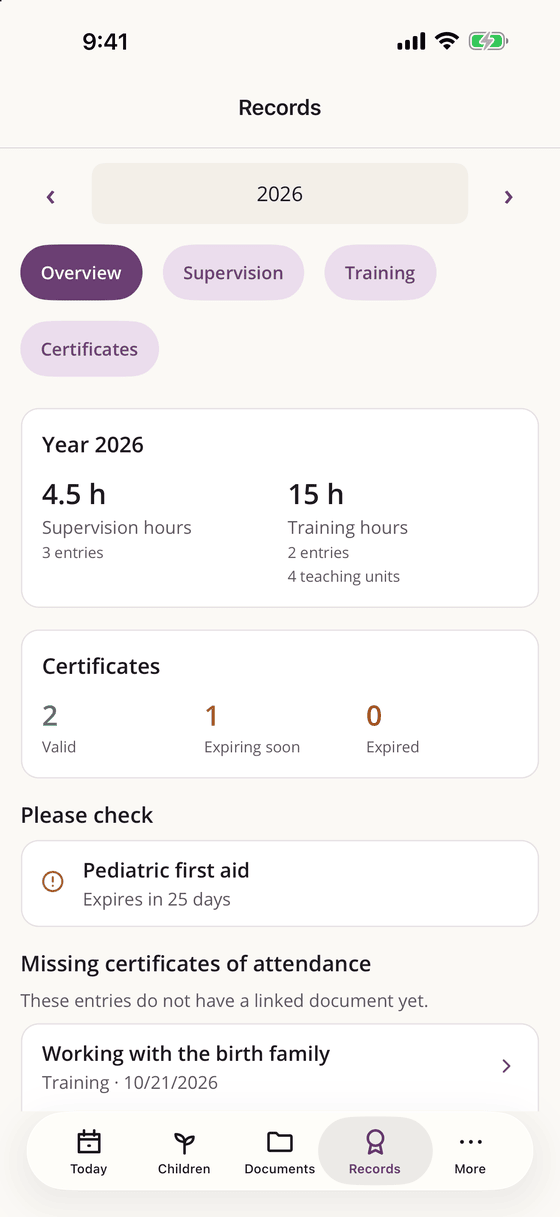
Sync through storage you already own
With Pro your devices stay in sync – end-to-end encrypted, through your own storage.
- iCloud Drive or another folder, WebDAV/Nextcloud/NAS, Google Drive or Dropbox
- The storage provider only sees encrypted files with random names
- New devices get access with a recovery key or by pairing with an existing device
- We do not operate any cloud storage for your data
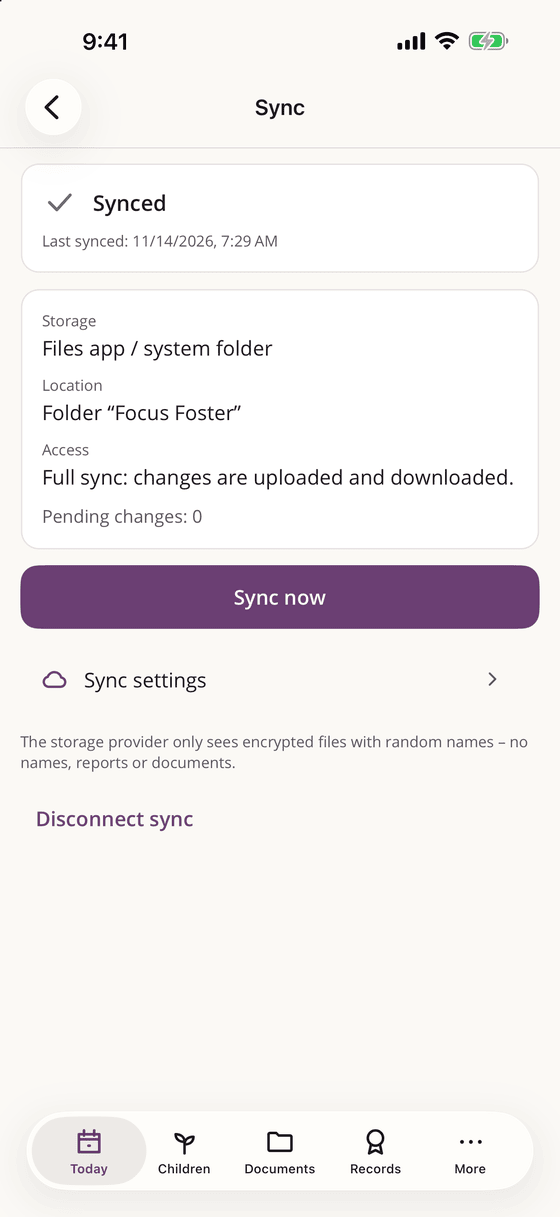
Report assistant
AI that suggests – you decide
The report assistant is optional and part of Pro. It never replaces text on its own and makes no risk scores, diagnoses or decisions about reports to authorities.
Processed on your device
On iPhone and iPad the assistant uses Apple’s on-device language model, on Android, Mac and Windows a local model (Phi-4-mini). Your text does not leave the device.
Side by side, change by change
Every suggestion appears next to your text. You accept or discard each change; only what you confirm is applied.
FactGuard checks every suggestion
A deterministic fact check compares your original with the suggestion and flags changed numbers, dates, quotes, people and negations as well as newly introduced diagnoses or judgments.
External AI only on request
External providers are off by default. You can connect one with your own API key and explicit consent; names can be replaced by placeholders first.
The local model is downloaded once from Hugging Face. Only your IP address is transmitted, no content.
Sync
End-to-end encrypted sync without our cloud
Sync is part of Pro and works through storage you choose yourself. Encryption happens on your device; neither the storage provider nor Software Notion can read your records.
Your device encrypts
Every change is encrypted on the device before it is written – with a vault key that only your devices know.
Your storage keeps it
iCloud Drive, a folder, WebDAV/Nextcloud/NAS, Google Drive or Dropbox only receive encrypted files with random names.
Software Notion sees nothing
We receive neither files nor keys nor credentials. If Pro ends, you can still download, export and disconnect your data.
Recovery key and pairing
New devices get access with your recovery key or by pairing with a device that is already unlocked. Keep the recovery key safe: without it and without an unlocked device, encrypted sync data cannot be recovered – not even by us.
Privacy
Privacy and security in detail
Focus Foster handles information about children. That is why security is built in, not added on.
AES-256-GCM on the device
Entries, documents and attachments are encrypted; the local data key is kept in the Keychain, the Android Keystore or Windows DPAPI.
App lock
PIN plus Face ID, Touch ID or fingerprint; a privacy cover hides the content in the app switcher.
Reminders without content
By default, notifications on the lock screen show no names or details.
Encrypted backup and full export
Create an encrypted backup or export everything at any time – free of charge, also after Pro ends.
A minimal account
An account is only needed for Pro. You sign in with Apple, Google or Microsoft; we store no e-mail address, no name and no profile picture.
No ads, no tracking
No analytics tools and no advertising. Crash notes stay on the device unless you attach one to a support request yourself.
Free and Pro
The free version covers everyday documentation including all security features. Pro adds the report assistant, sync and advanced tools.
Free
For everyday documentation
- Foster children, chronology and documents
- Search by title, category, tags and date
- Reports with the development report, progress report and free statement templates
- System text snippets, PDF and TXT export
- Encryption, app lock and encrypted backup
- Appointments, tasks and basic proofs
Pro
Subscription for more support
- Report assistant with local AI and FactGuard
- End-to-end encrypted sync through your own storage
- All further report templates, DOCX export and custom templates
- Your own text snippets and care planning preparation
- Text recognition and full-text search in documents
- Qualification portfolio
Prices and terms are shown only in the App Store, on Google Play or in the checkout. On iPhone, iPad, Android and in the Mac App Store you buy Pro in the app; on Windows and with the Mac installer from this website the purchase runs through our reseller Paddle. You sign in before purchasing so that Pro applies on all your devices. If Pro ends, all data stays available and readable. Terms of use · Refund policy · Privacy policy
On all your devices
One app for phone, tablet and computer – with the same encryption and the same data everywhere.
iPhone & iPad
iOS and iPadOS 17 or later. The report assistant uses Apple’s on-device language model on supported devices.
Android
Android 8.0 or later on phones and tablets. Text recognition runs on the device with Google ML Kit.
Mac
macOS 13 or later – from the Mac App Store or as an installer from this website for Apple silicon and Intel.
Windows
Windows 10 (version 1809) or later – from the Microsoft Store or as an MSI installer from this website for x64 and ARM64.
Links to the stores will appear here as soon as Focus Foster is available there.
Releases and outlook
Focus Foster is new. This is what we are working on and what comes next.
-
Version 1.0.0 · in development
The first release
A record for each child with chronology and documents, reports with PDF export, supervision and training proofs, appointments and tasks, app lock and encrypted backup. With Pro: the report assistant and end-to-end encrypted sync through your own storage.
-
Next
Improvements based on your feedback
Further versions are planned based on feedback from foster carers. Send us your wishes in the app under “Help & contact”.
Dates for future versions have not been set yet.
Frequently asked questions
Do I need an account?
No. Focus Foster works fully without an account and without an internet connection. An account is only needed to buy Pro and use it on several devices; you sign in with Apple, Google or Microsoft.
Where is my data stored?
Encrypted on your device. If you use sync, additionally end-to-end encrypted in storage you choose yourself. Software Notion receives no names, reports, documents or AI input.
What happens if Pro ends?
Nothing is deleted or hidden. You can still read and edit everything, export PDFs, create backups and download, export or disconnect an existing sync.
Does the report assistant send my texts to the internet?
Not by default – it runs on the device. Only if you set up an external AI provider with your own API key and confirm the warning is the selected text sent to that provider, with names replaced by placeholders beforehand by default.
Does the AI make decisions about the child?
No. The report assistant only suggests wording. It makes no risk scores, diagnoses or decisions about reports to authorities, and every change needs your confirmation.
What happens if I lose my phone?
The data on the device is encrypted and protected by the app lock. With sync and your recovery key you set up a new device; without sync you restore your encrypted backup. Without the recovery key, an unlocked device or the backup password, nobody can recover the data – not even us.
Does Focus Foster replace the youth welfare office or the foster care service?
No. Focus Foster is a personal tool for your documentation. It does not replace the youth welfare office, the foster care service, care planning or legal, medical or therapeutic advice. You remain responsible for all content.
Which languages are available?
German, English, Spanish, French, Turkish, Russian and Polish – in the app and on this website.
How do I reach support?
In the app under “Help & contact” (on the phone under More, on the computer in the settings and the Help menu) or by e-mail to focusfoster@software-notion.de. The support page explains which data a request contains.
Your records. Your devices. Your decision.
Start for free – no account, no cloud, no tracking.
Get Focus FosterFocus Foster does not replace the youth welfare office, the foster care service, care planning or legal, medical or therapeutic advice. You remain responsible for all content. Apple, iPhone, iPad, Mac and App Store are trademarks of Apple Inc.; Google Play and Android are trademarks of Google LLC; Windows and Microsoft Store are trademarks of Microsoft Corporation.
Terms of use · Refund policy · Privacy policy for the app · Cancel contracts here · Withdraw from contract · Help & contact